How to Cancel Your Artlist Subscription and What You Keep (2026)
Last verified: 2026-11-07
Go to My Account, Billing, the more icon, Subscription details and Cancel renewal. Any plan in our Artlist guide keeps running until the current period ends and then stops without another charge.
How do you cancel?
- In the AI tools, click the avatar at the top right.
- Select My Account, then Billing.
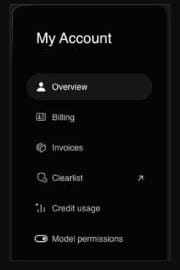
- Click the more icon and choose Subscription details.
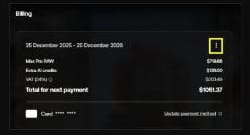
- Press Cancel renewal and follow the steps on screen. Change plan is beside it if you'd rather downgrade at the next renewal.
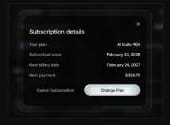
Section 4 of the Terms of Use says you can terminate at any time through the cancellation feature or customer support, the subscription ends with your current billing period, and you aren't charged after it.
The same section also says you're charged for the next period unless you give notice "within 14 calendar days before the beginning of the next billing cycle". Artlist's help article says you can cancel renewal at any time. To avoid a surprise charge, cancel at least 14 days before your renewal date.
Cancel, downgrade or upgrade?
| You want | What to do | When it takes effect |
|---|---|---|
| To stop paying | Cancel renewal | At the end of the current period |
| A cheaper plan | Change plan | At the next renewal |
| A bigger plan | Upgrade | At once: the new credit limit minus what you've used, with a prorated charge |
Can you get a refund?
Only if both of these are true:
- The payment was made in the last 14 days, whether a new subscription or a renewal.
- You haven't downloaded, generated or used anything since.
To ask, contact Artlist with the account name and email, the name on the payment method, the last 4 digits and expiry date of the card or your PayPal email, and a copy of the invoice. If consumer protection law gives you a right to cancel and be refunded, Artlist asks you to contact it as well.
Max Business runs on the Business Terms, which treat payments as final unless the law says otherwise.
Four examples of how the dates work:
| Case | Refund? |
|---|---|
| Monthly plan renewed on the 5th, nothing downloaded or generated since, request on the 15th | Yes, within the 14 days |
| Same plan, one track downloaded on the 6th | No |
| Yearly plan renewed in March, request in May | No, the 14 days have passed |
| New subscription, AI tests run on day 2 | No, generating counts as use |
What changes when the plan ends?
| Thing | After the last day |
|---|---|
| Videos published while subscribed | Stay covered and can stay monetized |
| Channels and videos on the Clearlist | Stay cleared |
| New projects using stock you downloaded | Not covered |
| Re-downloads, license certificates and cue sheets | Not available until you resubscribe |
| Monthly AI credits | Set to zero |
| Top-up credits | Lost when you cancel |
| AI images and video you made | Still yours to use, but no longer downloadable |
| Plugins | Fall back to a watermarked version |
| Custom voice | License ends with the subscription |
The Artlist license page explains the difference between stock assets and AI output.
What should you do before the last day?
- Download any AI generations you want to keep.
- Download song certificates and cue sheets for tracks you've used.
- Add every channel and video to your Clearlist. You can't add to it afterwards.
- Publish anything still in the edit that uses Artlist stock.
- Use your remaining credits.
Where each one lives:
| Task | Where |
|---|---|
| AI generations | Your projects and folders in the AI tools |
| Certificates and cue sheets | Downloads in the catalog's left menu, next to each track |
| Clearlist | The account menu at the top right |
Can you come back later?
Yes. Sign in, pick a plan and pay. Your download history, licenses and cue sheets return with it.
Do you need to cancel a free account?
No. The Artlist free trial account has no time limit and no payment details, so nothing ever charges.
What happens to a top-up or an upgrade when you cancel?
A top-up is lost the moment you cancel and isn't refundable then, so spend it first. An upgrade made earlier in the period stays in place until the period ends, because canceling only stops the renewal.
Can you delete the account?
Not with an active subscription. Once it has expired, contact Artlist. Deletion is final and removes saved projects and preferences.
What should you capture for your records?
Keep the invoice and the song certificate for each track you've published. Artlist's claims article names them as proof of coverage if a platform flags a video later.
If you leave because of the price and come back, our Artlist promo code page gives 2 free months on annual plans. If you're moving to another library, see the Epidemic Sound discount code.