Artlist License Explained: Pro, Social, Clients and AI Output (2026)
Last verified: 2026-11-07
Artlist licenses you to use the catalog assets in how Artlist works inside your own video projects. You don't own the tracks or clips. Anything you publish while subscribed stays covered forever, and new projects need an active plan.
This page explains the rules in the Artlist license, effective February 15, 2026.
Pro or Social: what's the difference?
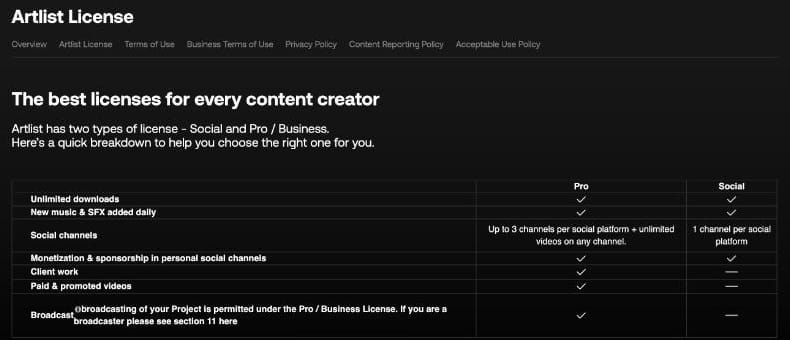
| Social | Pro | |
|---|---|---|
| Channels per platform | 1 | Up to 3, with unlimited videos on any channel |
| Monetization on your own channels | Yes | Yes |
| Client work | No | Yes |
| Paid and promoted videos | No | Yes |
| Broadcast | No | Yes |
| Websites on the Clearlist | No | Yes, 3 |
Max and the Footage & Templates plan come with Pro. Team plans raise monetized channels to 5 per platform, and Max Business makes them unlimited.
Is your project covered?
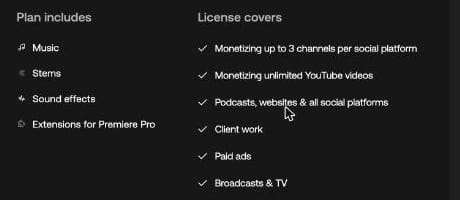
| Project | Lowest plan that covers it |
|---|---|
| Monetized videos on your own YouTube channel | Social, for 1 channel per platform |
| The same on a second or third channel per platform | Pro |
| A wedding or event film for a client | Pro |
| A paid social ad, for you or a client | Pro |
| A TV commercial | Pro, with performance royalties paid outside the license |
| A podcast | Social for 1 per platform, Pro for 3 |
| Video on your website, cleared on the Clearlist | Pro, for up to 3 websites |
| A billboard, out-of-home screen, DVD or audiobook | Max Business |
| An app, game or software | Enterprise |
| Any stock use at a company over 50 employees, or an agency | Max Business or Enterprise |
| A stock track released on Spotify, a lyric video, or a song over a still image | Not covered on any plan |
What is the Max Pro license?
The same Pro license as Music & SFX Pro, applied to more of the catalog. Max adds footage, templates and LUTs, and all of it sits under Pro rules: 3 channels per platform, client work, paid ads and broadcast. Max Teams carries Pro too. Max Business is the plan that moves you to the Business license.
Do you need Max Business?
If you work for an agency, a broadcaster, or a company with more than 50 employees, the license says you must have Max Business or a custom Enterprise license. A group of companies counts as one. Plans made up only of AI services are exempt.
Apps, games and software need Enterprise, as do teams over 7 seats. Max Business adds audiobooks, DVD and Blu-ray, out-of-home and billboards.
What happens to your videos when you stop paying?
Published projects stay covered and can keep earning. The line is the publish date:
| Situation | Covered? |
|---|---|
| Downloaded and published while subscribed | Yes, forever |
| Downloaded while subscribed, published after | No |
| New project using an old download | No |
| Same video kept online after canceling | Yes |
The steps are on our page about how to cancel your Artlist subscription.
Can you put Artlist music on Spotify?
No. The license allows assets only as part of a larger project, so stock tracks can't go out on their own. It names music streaming, music channels and radio, and it also rules out:
- Static videos or looping animations with Artlist music behind them
- Lyric videos
- Registering a track or a project with YouTube Content ID or Facebook Rights Manager
- Using an asset in a logo or trademark
- Remixes or covers as stand-alone works
- Reselling assets or uploading them to stock platforms
Podcasts are covered. Artlist's Music and SFX article calls the standard license a synchronization license and names podcasts as the exception to the audio-only rule.
Are clients covered?
Yes, on Pro and above. You download the asset and make the project, then hand it over, and your client can publish it. Only you hold the license, so a client can't download assets on it.
To hand over a project:
- Download every asset under your own Pro, Max or Business plan.
- Finish the edit. The client receives the project, not the source files on your account.
- If the client publishes on YouTube, go to Clear your videos on your Clearlist, press Create Invite Link and send it with the video's URL. The link works for 30 days.
- Send the song certificates from your Downloads page with the delivery.
One rule changes the plan. Artlist's help article says that creating projects with stock assets "on behalf of a company with more than 50 employees" needs Max Business or Enterprise, regardless of how many people use the account.
Can you edit the music?
Yes. The Help Center says you can edit stems in any way to fit your video project. You still hold a license to use the music, not ownership, so you can't take credit for a new composition built from it, and a remix can't go out as a work of its own.
How many devices can you use?
The license lets you use Artlist's tools on up to 2 devices. Individual plans are for one person, and the Unlimited rules on the pricing page rule out account sharing. For more people, Teams plans have 2 to 7 seats and Max Business has 7 members.
Where is your proof of license?
On the Downloads page. Each download has a re-download link and a license certificate, and songs also have a cue sheet. Once a subscription expires, none of them can be downloaded until you subscribe again, so save the certificates for anything you publish.
How many downloads does "unlimited" mean?
The license sets "reasonable" at 40 songs, 100 sound effects, 40 templates and 100 clips a day. Downloading by bots or software is prohibited.
| Asset | Per day |
|---|---|
| Songs | 40 |
| Sound effects | 100 |
| Footage clips, animations and 3D | 100 |
| Templates | 40 |
| LUTs | 40 |
| AI generations | No daily limit |
The count resets at midnight UTC, and downloading something again from your history doesn't count.
Who pays royalties for TV or public performance?
You or the broadcaster. Broadcast and public performance are permitted on Pro, but the license doesn't cover payments to performance rights organizations. Online publishing is pre-cleared, and an artist's registration with one of those organizations has no effect on your license, according to Artlist's Help Center.
Which documents make up the license?
| Document | Date | What it governs |
|---|---|---|
| Artlist License | Effective February 15, 2026 | Stock assets and Artlist-made AI content |
| Terms of Use | October 14, 2026 | Your account, billing, and your AI output in section 14 |
| Acceptable Use Policy | October 15, 2026 | What you may not do with assets or AI tools |
| Business Terms of Use | October 14, 2026 | Max Business and business accounts |
How is AI output different?
Artlist separates two things.
| Asset | AI Output | |
|---|---|---|
| What it is | Stock catalog, plus AI content Artlist made and offers for download | What you generate with the AI tools |
| Governed by | License | Terms of Use, section 14 |
| After your subscription ends | No new projects | Yours to keep using commercially |
| Stand-alone release | Not allowed | No such ban in the License, Terms of Use or Acceptable Use Policy |
| Edited with AI | Stays an Asset | Stays Output |
For Output, Artlist assigns you whatever rights it has and doesn't restrict commercial use. The same section says output may not be unique or protectable in every country, and that Artlist doesn't guarantee it's original or non-infringing. Download what you want to keep, since an expired account can't download generations. The Acceptable Use Policy forbids removing AI labels or watermarks and requires you to follow any disclosure rules that apply where you publish.
Can you release AI music you made on Artlist on Spotify?
We don't know, and we haven't been able to verify it either way. Here is how we read it.
- Stock music, no. The license bars stock tracks on their own, and that includes AI content Artlist made and put in its catalog.
- Your own generations, probably. Songs you generate yourself count as Output, a separate category. The Terms of Use give you whatever rights Artlist holds and don't restrict commercial use, and we found no rule against standalone release in the License, the Terms or the Acceptable Use Policy.
- What we haven't read. Artlist's AI music runs on Google's Lyria models, and we haven't read Google's terms for them. Artlist's documents also never name music when they describe Output.
- Why it could still go wrong. The Terms say Output may not be unique, so another user could get a very similar track. A distributor's content matching could then flag your release. The Acceptable Use Policy also requires you to follow any AI labeling rules that apply where you publish.
If a release matters to you, ask Artlist support in writing before you upload.
Who owns a custom voice?
Not you. The terms give you a limited, revocable license to a voice you clone, for as long as your subscription is active, and you can delete it from your account. What you generate with it counts as Output, like any other generation. The Acceptable Use Policy bars using a voice from Artlist's assets to build a replica.
Can you feed Artlist assets into AI tools?
Yes, with limits. You can use them as input, but not to train models, and not with services that claim rights over the result or show it to other users. Whatever comes out still counts as an Asset.
How do you stop YouTube claims?
Add your channel or video to the Clearlist while your plan is active. If a claim has already landed, follow our guide to Artlist YouTube copyright claims.
An Artlist discount code gives 2 free months on annual plans. Licensing with another library? See the Epidemic Sound discount code.