Got a YouTube Claim on Artlist Music? What to Do by Claimant (2026)
Last verified: 2026-11-07
Look at who made the claim. If it says Artlist Ltd, your channel or video almost certainly isn't on your Clearlist, the claim-protection list in how Artlist works. Dispute on YouTube, then add it. If it's anyone else, send Artlist the claim details.
What do you do for each claimant?
| Claim says | Usual cause | What to do |
|---|---|---|
| Artlist Ltd | Channel or video not on your Clearlist | Dispute on YouTube, then add it to your Clearlist |
| Artlist Ltd (Music Publishing) | Not given | Dispute on YouTube, and check your Clearlist |
| Anyone else | Another rights holder or a false match | Contact Artlist with the details below |
These steps come from Artlist's article on copyright and Content ID claims. When the channel is listed, the article says, the claim clears automatically.
For a claim from someone else, send Artlist:
- A link to the track on Artlist, or the artist and song title
- A public link to the video
- A screenshot of the claim details showing the claimant and timestamp
What should you check before you dispute?
- The claimant's name. It decides which row of the table above you're on.
- The download. The track has to have been downloaded under an active subscription. Your Downloads page shows it, with its license certificate.
- The listing. Open your Clearlist and look for the channel, or for the single video.
- The use. A Social plan doesn't cover client work, paid ads or a second channel on the same platform. A claim on those may be valid.
- The publish date. Videos published after the plan ended aren't covered, even with a track downloaded while you paid.
Which situation are you in?
| Situation | What happens |
|---|---|
| Channel on the Clearlist before upload | A claim from Artlist Ltd clears automatically |
| Claim first, channel added afterwards | The claim clears and monetization returns, but earnings from the claimed period aren't paid back |
| Plan expired, channel never listed | You can't add it now |
| Video published after the plan ended | Not covered, and the claim may be valid |
| Music downloaded outside an active plan | Artlist can't remove the claim |
Why does a licensed video get claimed?
Artlist registers its music with YouTube's Content ID, so uploads with its tracks are matched automatically. YouTube then checks whether the video or channel is on the Clearlist. If it isn't, a claim may follow, even for music you downloaded legally.
How do you add a channel to the Clearlist?
Open the account menu at the top right and choose Clearlist.
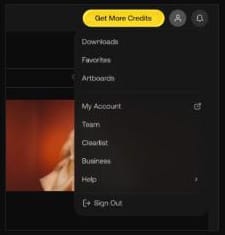
- Select a platform.
- Enter the full channel URL or channel ID.
- Select your channel when its icon and name appear.
On YouTube, pasting the exact channel ID avoids most errors, according to Artlist's Clearlist article. A channel with no uploads needs the ID instead of a name or URL.
For one video, use Clear your videos, paste the URL and press Clear video.
How many channels can you list?
| Social | Pro | Team | |
|---|---|---|---|
| YouTube, Facebook, Instagram, TikTok, Twitch, podcast | 1 each | 3 each | 5 each |
| Websites | None | 3 | Not stated |
| Single YouTube videos | None | Unlimited | Yes |
Enterprise plans can list unlimited channels. The Clearlist protects content with Artlist's music. Sound effects, footage, AI voiceover, AI images and AI video don't need it.
How would a Pro plan cover three channels and a client?
Say you run a main YouTube channel and a Shorts channel, and you also edit for a client who posts on their own channel:
| Where it's published | How to clear it | Slots used on Pro |
|---|---|---|
| Your main YouTube channel | Add the channel | 1 of 3 YouTube |
| Your Shorts channel | Add the channel | 2 of 3 YouTube |
| The client's YouTube channel | Send an invite link, or clear each video by URL | None: single videos are unlimited |
| Your TikTok and Instagram | Add each channel | 1 of 3 on each platform |
| Your website | Add the site | 1 of 3 websites |
On Social the same setup doesn't fit: one channel per platform, no client work and no single videos.
How do you clear a client's video?
Under Clear your videos, press Create Invite Link, add the YouTube URL and share the link. It works for 30 days and needs a Pro, Team or Business plan.
Will you get paid for the time a video was claimed?
No. Add your channel and any claim from Artlist Ltd clears and monetization returns, but the Artlist license says lost earnings from before the listing aren't reimbursed. List new channels before you upload.
What happens to the Clearlist after you cancel?
Anything registered during an active plan stays cleared. You can't add channels or videos after it ends, and a re-upload or new video after that date can be claimed. Our guide on how to cancel your Artlist subscription covers the rest.
When can't Artlist remove a claim?
When the music wasn't downloaded under an active subscription, or the use falls outside your license. The article says such a claim may be valid.
What about Facebook, Instagram and TikTok?
| Platform | Steps |
|---|---|
| Facebook, Instagram | Check the video meets community guidelines, then file a dispute in Meta's system with your Artlist license details. Allow up to 7 days. If it's rejected, contact Artlist. |
| TikTok | Check the video follows TikTok's music policy, then contact Artlist. |
| Other platforms | Use the dispute option and send your license certificate or invoice. |
On a Pro plan you can post on channels beyond the three on your Clearlist. If one gets a false claim on another platform, contact Artlist.
Keep your song certificates. They sit under Downloads next to each track and disappear with an expired plan.
FAQ
How long does a claim take to clear?
A claim from Artlist Ltd clears automatically once the channel or video is on your Clearlist. Disputes on Facebook and Instagram take up to 7 days.
Can a client clear a video on your license?
Yes, through you. Send them an invite link from your Clearlist, valid for 30 days, on a Pro, Team or Business plan.
Can you clear a YouTube video without listing its channel?
Yes, on Pro and above. Clear your videos takes a single video's URL, and Pro allows unlimited single YouTube videos. Social has no single-video option.
An active plan is what keeps new uploads covered, and our Artlist discount code gives 2 free months on annual plans. Epidemic Sound subscribers have a similar setup, and its current offer is on our Epidemic Sound coupon code page.